7 Days To Die: Importing a local game
by Gnarrak The Destroyer
See another page dedicated to this very problem.
1. Make 2 folders on your desktop: one named “save_game” and one named “user_data”
2. Go to the save location shown in pic and copy the folder that matches your world name, the serveradmin.xml and profiles.sdf, copy the 3 items into the Save_Game folder made on desktop (edited)
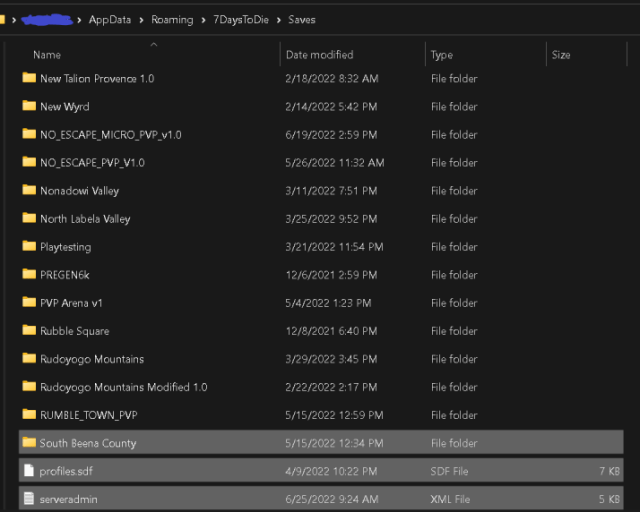
3. Once you copy open the world and re-name the save to “MyGame” it will have the name of what it was locally before you re-name it.

4. Open the new User_Data file on desktop and make a folder in it called “GeneratedWorlds” and place your world(map) in it once located.

5. After all the files are in the locations highlight the 2 files and compress to a zip file…
6. Name the zip and upload the save to the website via the manage>files/mods section. Activate the world and restart the server
See sample file. And its contents:
.
├── save_game
│   └── East Tausa County
│       └── MyGame
│           ├── blockmappings.nim
│           ├── ConfigsDump
│           │   ├── archetypes.xml
│           │   ├── biomes.xml
│           │   ├── blockplaceholders.xml
│           │   ├── blocks.xml
│           │   ├── buffs.xml
│           │   ├── dialogs.xml
│           │   ├── dmscontent.xml
│           │   ├── entityclasses.xml
│           │   ├── entitygroups.xml
│           │   ├── gamestages.xml
│           │   ├── item_modifiers.xml
│           │   ├── items.xml
│           │   ├── loadingscreen.xml
│           │   ├── loot.xml
│           │   ├── materials.xml
│           │   ├── misc.xml
│           │   ├── nav_objects.xml
│           │   ├── npc.xml
│           │   ├── painting.xml
│           │   ├── physicsbodies.xml
│           │   ├── progression.xml
│           │   ├── qualityinfo.xml
│           │   ├── quests.xml
│           │   ├── recipes.xml
│           │   ├── rwgmixer.xml
│           │   ├── sounds.xml
│           │   ├── spawning.xml
│           │   ├── traders.xml
│           │   ├── ui_display.xml
│           │   ├── utilityai.xml
│           │   ├── vehicles.xml
│           │   ├── weathersurvival.xml
│           │   ├── worldglobal.xml
│           │   └── XUi
│           │       ├── controls.xml
│           │       ├── styles.xml
│           │       ├── windows.xml
│           │       └── xui.xml
│           ├── decoration.7dt
│           ├── gameOptions.sdf
│           ├── itemmappings.nim
│           ├── main.ttw
│           ├── main.ttw.bak
│           ├── Player
│           │   ├── 76561198043581047.map
│           │   ├── 76561198043581047.ttp
│           │   ├── 76561198043581047.ttp.bak
│           │   ├── 76561198149766437.map
│           │   ├── 76561198149766437.ttp
│           │   ├── 76561198149766437.ttp.bak
│           │   ├── 76561198282863223.map
│           │   ├── 76561198282863223.ttp
│           │   └── 76561198282863223.ttp.bak
│           ├── players.xml
│           ├── power.dat
│           ├── power.dat.bak
│           ├── Region
│           │   ├── r.0.-1.7rg
│           │   ├── r.0.-2.7rg
│           │   ├── r.0.-3.7rg
│           │   ├── r.0.-4.7rg
│           │   ├── r.-1.-1.7rg
│           │   ├── r.1.-1.7rg
│           │   ├── r.-1.-2.7rg
│           │   ├── r.1.-2.7rg
│           │   ├── r.-1.-3.7rg
│           │   ├── r.1.-3.7rg
│           │   ├── r.-1.-4.7rg
│           │   ├── r.1.-4.7rg
│           │   ├── r.2.-1.7rg
│           │   ├── r.-2.-2.7rg
│           │   ├── r.2.-2.7rg
│           │   ├── r.-2.-3.7rg
│           │   ├── r.2.-3.7rg
│           │   ├── r.-2.-4.7rg
│           │   ├── r.2.-4.7rg
│           │   ├── r.2.-5.7rg
│           │   ├── r.3.0.7rg
│           │   ├── r.-3.-1.7rg
│           │   ├── r.3.-1.7rg
│           │   ├── r.-3.-2.7rg
│           │   ├── r.3.-2.7rg
│           │   ├── r.4.0.7rg
│           │   ├── r.-4.-1.7rg
│           │   ├── r.4.-1.7rg
│           │   ├── r.-4.-2.7rg
│           │   └── r.-5.-1.7rg
│           ├── vehicles.dat
│           └── vehicles.dat.bak
└── user_data
    └── GeneratedWorlds
        └── East Tausa County
            ├── biomes.png
            ├── checksums.txt
            ├── dtm_processed.raw
            ├── dtm.raw
            ├── GenerationInfo.txt
            ├── main.ttw
            ├── map_info.xml
            ├── prefabs.xml
            ├── radiation.png
            ├── spawnpoints.xml
            ├── splat3.png
            ├── splat3_processed.png
            ├── splat4_processed.png
            └── water_info.xml
Related posts:

Question I wanted to ask how the time in server works. Does the time count

As the gaming landscape evolves, customer feedback continues to guide our improvements and innovation at

If you’re a 7 Days to Die fan then the entire fiber of your being